> ## Documentation Index
> Fetch the complete documentation index at: https://docs.opensourcemalware.com/llms.txt
> Use this file to discover all available pages before exploring further.
# Proactive email notifications
> Get email alerts about new threats.
Threat Alerts let you monitor the database for new verified threats that match terms you define. When a matching threat is added, we email the address associated with your account. You can customize alerts by severity, asset type, or both.
 ## Create an alert
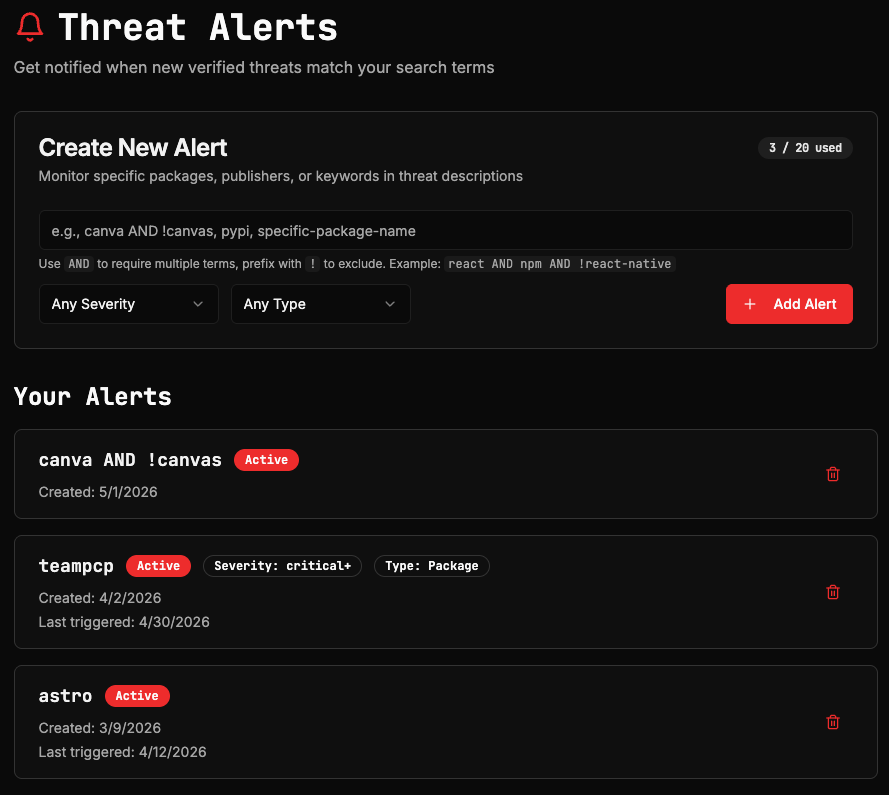
Click your profile avatar in the top right and select **Threat Alerts** from the menu. This is where you create and manage all of your alerts.
Enter a keyword or search term in the alert field. This can be a package name, publisher, registry, or any term that appears in threat descriptions.
Use `AND` to require multiple terms and `!` to exclude terms. For example: `react AND npm AND !react-native`.
Optional: Restrict alerts by **Severity** (Critical, High, Medium, or Low) or **Type** (Package, Repository, URL, or Domain). If you leave these unset, the alert will match threats of any severity and type.
Click **Add Alert** to save. The alert is active immediately.
Free users get two alerts, and can get up to two notifications per day. Enterprise accounts can configure higher volumes. [Contact us](https://opensourcemalware.com/contact) to discuss your needs.
## Email notifications
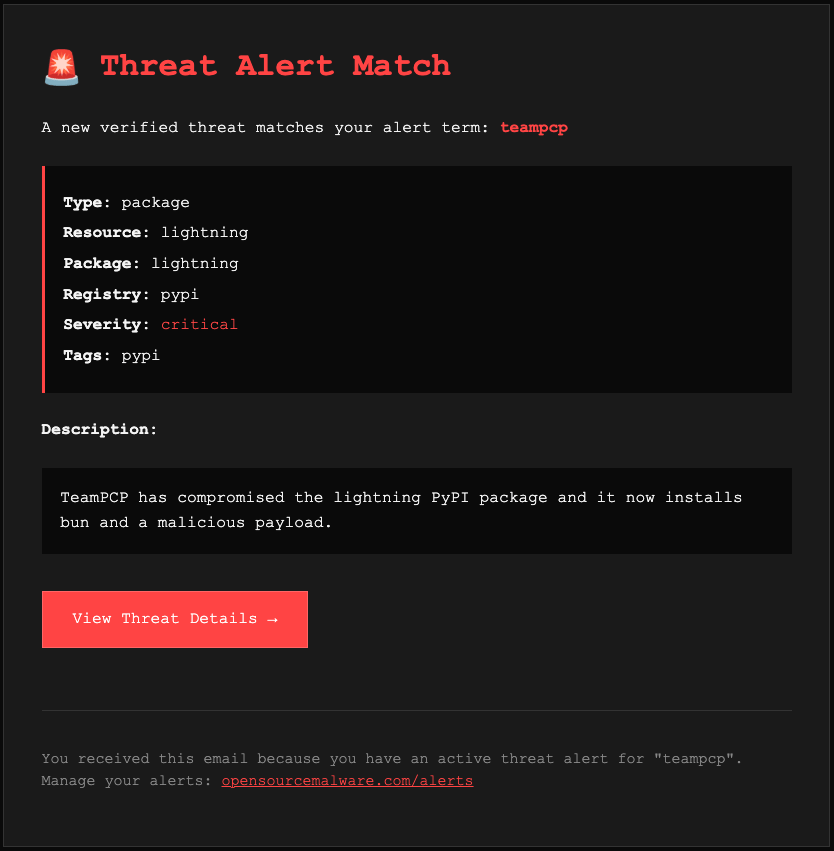
When a new verified threat matches one of your active alerts, we send an email notification to the address on your account. **Make sure you're actively monitoring the email address you registered with.**
The notification includes the alert term that matched, the asset type, resource name, registry, and severity level, a brief description of the threat, and a direct link to the full threat record.
## Create an alert
Click your profile avatar in the top right and select **Threat Alerts** from the menu. This is where you create and manage all of your alerts.
Enter a keyword or search term in the alert field. This can be a package name, publisher, registry, or any term that appears in threat descriptions.
Use `AND` to require multiple terms and `!` to exclude terms. For example: `react AND npm AND !react-native`.
Optional: Restrict alerts by **Severity** (Critical, High, Medium, or Low) or **Type** (Package, Repository, URL, or Domain). If you leave these unset, the alert will match threats of any severity and type.
Click **Add Alert** to save. The alert is active immediately.
Free users get two alerts, and can get up to two notifications per day. Enterprise accounts can configure higher volumes. [Contact us](https://opensourcemalware.com/contact) to discuss your needs.
## Email notifications
When a new verified threat matches one of your active alerts, we send an email notification to the address on your account. **Make sure you're actively monitoring the email address you registered with.**
The notification includes the alert term that matched, the asset type, resource name, registry, and severity level, a brief description of the threat, and a direct link to the full threat record.
 ## Manage your alerts
All active alerts are listed on the Threat Alerts dashboard. Each alert shows the keyword, any filters applied, when it was created, and when it last triggered. To remove an alert, click the trash icon on the right.
## Manage your alerts
All active alerts are listed on the Threat Alerts dashboard. Each alert shows the keyword, any filters applied, when it was created, and when it last triggered. To remove an alert, click the trash icon on the right.